Tech Vaidya WhatsApp Channel
Get AI updates, tech news, cybersecurity alerts and useful tech tips directly on WhatsApp.

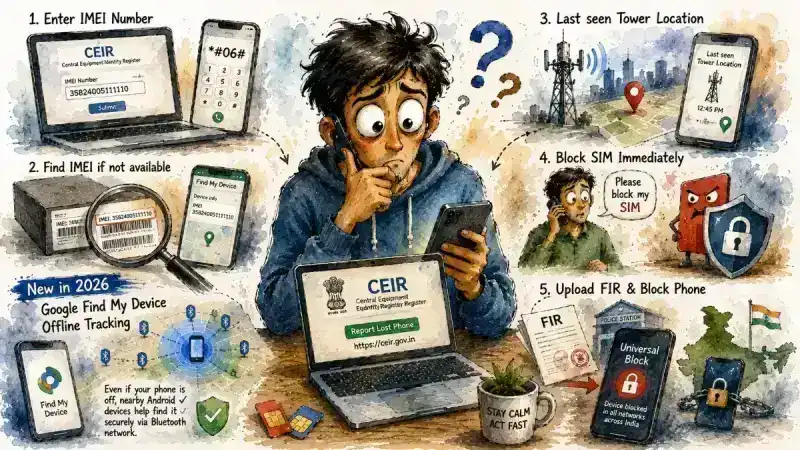
Losing a smartphone today is far more stressful than simply losing an expensive gadget. Your phone contains banking apps, UPI accounts, emails, personal photos, office documents, passwords, social media accounts, health records, and sometimes even digital identity documents. If it falls into the wrong hands, the financial and privacy risks can be much greater than the cost of replacing the device itself. The situation becomes even more worrying when the thief immediately switches the phone off, leaving many people believing there's no way to recover it.
Fortunately, smartphone security has improved significantly over the last few years. India now has the Central Equipment Identity Register (CEIR), while Google has introduced a much smarter Find My Device network that can help locate supported Android phones even when they are offline. However, many users misunderstand what each system actually does. Some expect CEIR to show the live location of a stolen phone, while others don't realize Google's offline tracking must be enabled before the phone is lost.
Knowing what to do during the first few minutes after losing your phone can make a huge difference. The correct sequence of actions not only improves your chances of recovering the device but also protects your personal information from being misused. Unfortunately, many people waste valuable time installing fake tracking apps or visiting unofficial websites that promise impossible results.
This guide explains what CEIR actually does, how Google's new offline tracking works, how to secure your SIM card, and the essential steps every Android user should complete before losing their phone.
What Is CEIR and What Does It Actually Do?
The Central Equipment Identity Register (CEIR) is an initiative by the Department of Telecommunications (DoT), Government of India. Its primary objective is to prevent stolen or lost mobile phones from being used on Indian mobile networks. Many people believe that filing a complaint on CEIR instantly reveals the phone's location on a map. That is not how the system works.
CEIR primarily operates using your phone's IMEI (International Mobile Equipment Identity) number. Once your complaint is verified, the IMEI can be blocked across participating mobile networks, making the device unusable with Indian telecom operators. This significantly reduces the resale value of stolen phones and discourages mobile theft.
Think of CEIR as a national security system rather than a live tracking service. Its purpose is to disable stolen devices, not continuously display their location.
 Worried About UPI MDR Charges? Digital Rupee Could Become an Alternative
 Should You Buy a Laptop or Is a Tablet Enough? The Answer Has Changed in 2026
 Why Is Your 5G Data Draining So Fast? Try These Android Settings
 Paying for Gigabit but Getting Kbps? The 5-Minute Secret to Unlocking Your Wi-Fi
 Did You Know Your Money Is Locked in NPCI Servers for 45 Minutes Before Reaching the Recipient?
Your IMEI Number Is More Important Than You Think
To use CEIR, you'll need your phone's IMEI number. Unfortunately, many users only realize its importance after their phone has already disappeared.
If your device is lost, don't panic. The IMEI is usually printed on the barcode sticker attached to the original phone box. That's one reason it's always worth keeping the retail packaging. Depending on the manufacturer, you may also find the IMEI in your purchase invoice, your online account with the phone brand, or within Google's device information if the phone was previously linked to your Google account.
Recording your IMEI somewhere safe before an emergency occurs can save valuable time later.
Don't Forget Your SIM Card
Many people focus entirely on recovering the phone and overlook an even bigger risk—SIM Swap fraud.
A criminal with access to your SIM card may attempt to receive OTPs, reset passwords, or access banking services linked to your mobile number. As soon as you realize your phone is missing, contact your telecom provider and request immediate SIM barring or temporary suspension of the SIM.
You should also file a police complaint. Many Indian states now allow online FIR or lost property reports. A copy of the FIR or complaint can later be uploaded to CEIR while requesting IMEI blocking. This adds official documentation to your request and supports the blocking process.
Can CEIR Tell You Where Your Phone Is?
This is probably the biggest misconception surrounding CEIR.
The portal does not function as a live GPS tracking service for the public. It does not continuously display your stolen phone's location after you submit a complaint.
Telecom operators and law enforcement agencies may, in certain situations, use network information during official investigations. However, ordinary users should not expect CEIR to display a moving location pin on a map.
Its primary responsibility is blocking the device from being reused on Indian mobile networks—not helping users monitor its location in real time.
Google's Offline Find My Device Is a Game Changer
This is where Google's latest Find My Device network makes a significant difference.
Older phone tracking systems required the lost phone to remain connected to the internet. Once switched off or disconnected, tracking usually stopped. Google's newer system works differently on supported Android devices.
If Find My Device was enabled before the phone was lost, compatible Android phones—including many Samsung, Pixel, and newer Android devices—can securely participate in Google's encrypted Bluetooth finding network. Nearby Android devices anonymously help detect lost phones and update their approximate location without revealing anyone's personal information.
This dramatically increases the chances of locating certain lost devices compared to older tracking methods. However, there's one important condition: the feature must already be enabled before your phone goes missing.
Enable These Settings Before It's Too Late
Every Android user should verify that Find My Device is enabled today—not after losing the phone.
On most devices, you'll find it under Settings > Security & Privacy > Find My Device or Google > Find My Device, depending on the manufacturer. Make sure your Google account is signed in, Location Services are enabled, and Bluetooth remains available for the offline finding network if your device supports it.
If your phone is ever lost, you can visit android.com/find or use another Android device to ring the phone, lock it remotely, display a recovery message, erase sensitive data, or view its last available location.
Preparing these settings in advance often makes the difference between recovering a device and losing it permanently.
What If You Recover the Phone Later?
Blocking your phone through CEIR doesn't permanently destroy it.
If your device is eventually recovered, you can request the IMEI to be unblocked through the same portal after completing the required verification process. This means you shouldn't hesitate to block a stolen phone immediately. It's designed as a protective measure rather than a permanent punishment for the device.
While waiting for recovery, it's also wise to change passwords for banking apps, email accounts, social media platforms, and any important online services connected to the phone. If you use two-factor authentication, review your backup recovery methods as well.
The biggest mistake people make isn't losing their smartphone—it's being unprepared before it happens.
Every smartphone owner should record their IMEI number, enable Google's Find My Device service, securely store the phone's purchase invoice, and activate two-factor authentication for important accounts. These simple precautions take only a few minutes but can save enormous stress later.
Most importantly, remember that CEIR and Google Find My Device are not competing services—they solve different problems. CEIR helps prevent your stolen phone from being misused, while Google's Find My Device improves your chances of locating it. Using both together provides the strongest protection available for Android users in 2026.

No Comment Yet.
Stay informed with breaking news, trending stories, and in-depth analysis.