Tech Vaidya WhatsApp Channel
Get AI updates, tech news, cybersecurity alerts and useful tech tips directly on WhatsApp.

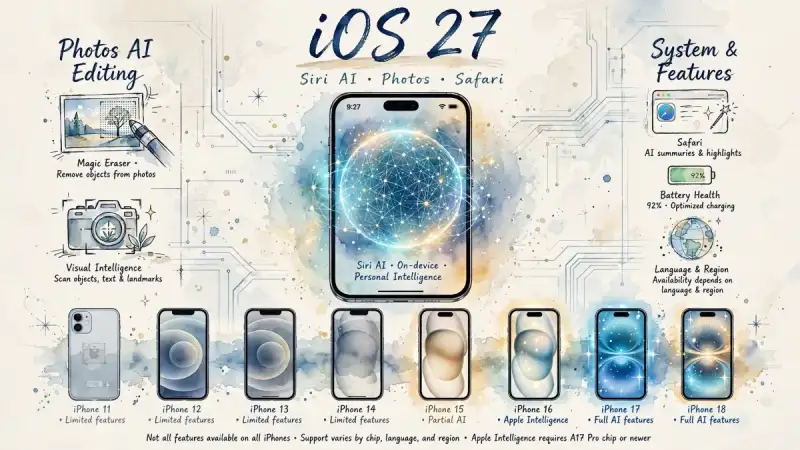
When Apple launches a new iPhone, attention usually goes to the camera, processor and design. But for people who already own an iPhone, the biggest change often comes through the operating system. That is why iOS 27 matters. It gives existing users a chance to experience new features without immediately buying a new device. A redesigned Siri experience, AI-assisted photo editing, camera-based information search and practical Safari improvements are among the key highlights of this release.
However, a new iOS version does not mean that every iPhone will receive every feature. iOS 27 supports a wide range of models, including several older iPhones. But advanced capabilities such as Siri AI and Apple Intelligence depend on the device’s processor, language and regional availability. The more important question, therefore, is not simply what iOS 27 introduces, but what your particular iPhone can actually do after the update.
Siri AI Gets a New Direction
Siri has been part of the iPhone experience for many years. It can make calls, set alarms, provide weather updates and answer simple questions. But expectations have changed as artificial intelligence has developed. Users now want more than an assistant that responds to isolated commands. They expect an assistant that understands context, follows up on previous questions and helps complete tasks in a more natural way. With iOS 27, Apple is moving Siri further in that direction.
The new Siri experience focuses on more natural conversations, better understanding of context and assistance with supported tasks. If a user asks a follow-up question, Siri is expected to handle the connection with the earlier conversation more naturally. Getting help with writing, finding information or completing certain tasks may also become easier. However, these capabilities will not be available in exactly the same way on every iPhone, in every language or in every region.
This is where the difference between traditional Siri and Siri AI becomes important. The change is not limited to a new voice or visual design. Apple is also working to improve how Siri understands requests, maintains conversational context and assists with supported actions. That does not mean Siri can automatically perform every task inside every app.
The updated Siri experience places greater emphasis on continuous conversations and the ability to carry context from one interaction to the next. This moves Siri beyond a simple voice-command tool and closer to a digital assistant that can support everyday activities. The actual usefulness, however, will depend on the iPhone model, language settings and features available in the user’s region.
Which iPhones Will Get iOS 27?
 Apple Intelligence vs Google Gemini 2026: The Hidden Costs Most Buyers Ignore
 What is Matter? The Future of Smart Home Compatibility
 Oracle’s AI Ambition Comes at a Human Cost: 7,000–10,000 Tech Jobs at Risk?
 NSE IPO Opens September 17: Share Price Set at ₹1,700–₹1,785 — Should Investors Apply?
 ₹156 Crore Technology Centre in Devanahalli: What It Could Mean for Small Businesses
The iOS 27 compatibility list includes both older and newer iPhones. Users of the iPhone 11 can also receive the update, while the iPhone 12, iPhone 13, iPhone 14 and iPhone 15 families are supported as well. The iPhone 16, iPhone 17 and iPhone 18 families are also included. This means iOS 27 is not limited to people who have purchased the latest iPhone.
There is, however, an important distinction. Not every iPhone that supports iOS 27 will support the full range of Siri AI or Apple Intelligence features. Major Apple Intelligence capabilities are available on the iPhone 15 Pro, iPhone 15 Pro Max and later AI-capable models. Even on supported devices, feature availability may vary depending on the processor, language and region.
In other words, an iPhone 11 user may receive iOS 27 without receiving every advanced AI feature available on a newer iPhone. Software compatibility and access to advanced AI capabilities are two different things. Users should first check whether their model supports iOS 27 and then verify which specific features are available on that device.
Major iPhone Models Supported by iOS 27
iPhone 18 series and newer models
iPhone 17 series
iPhone Air
iPhone 17e
iPhone 16 series
iPhone 16e
iPhone 15 series
iPhone 14 series
iPhone 13 series
iPhone 12 series
iPhone 11 series
iPhone SE, second generation and later
The key point is that receiving the iOS 27 update does not automatically mean receiving Apple Intelligence. AI features can differ even between models from the same generation because of differences in their processors and hardware capabilities.
AI-Powered Photo Editing
The iPhone camera is already capable of producing high-quality photographs. But after taking a picture, users often depend on third-party editing apps to remove unwanted objects or improve the composition. With iOS 27, AI-assisted editing in the Photos app is designed to make some of these tasks easier. The aim is to help users remove unwanted elements, modify selected parts of an image or create a revised version of a scene.
AI editing can involve software reconstructing parts of an image based on what it believes should be there. The result may therefore become an AI-assisted interpretation rather than an exact record of the original scene. For everyday users, this can be useful. Removing an unwanted object from a holiday photograph or adjusting a distracting background may require less effort.
But the distinction between enhancement and alteration matters. In journalism, documentary work, legal records or photographs used as evidence of real events, AI-based changes should be handled with caution. Making an image more attractive is different from changing information contained in the image. Users need to understand that difference before relying on AI editing.
Camera-based visual intelligence is another notable direction. Users may be able to ask questions about objects visible through the camera or receive information about what they are seeing. This moves the smartphone beyond being a device for taking pictures and towards becoming a tool for understanding the surrounding world. However, AI-generated information should not be treated as final truth without verification.
Practical Changes Coming to Safari
Safari is also receiving new features in iOS 27. These changes may be useful for people who regularly read news, browse websites, shop online or use the browser for work. The broader goal is to make information easier to manage and improve the browsing experience according to the user’s needs.
Features similar to “Notify Me” may help users track specific changes on supported webpages. For example, a user may be able to receive information when a price or particular detail changes on a product page. But availability will depend on the webpage, region and feature support. Safari should not be understood as a system that automatically tracks every change on every website.
Improvements related to webpage management, tab organisation and information discovery may appear less dramatic than a major AI announcement. Yet these are the kinds of changes that can save time during everyday use. The value of iOS 27 should not be measured only by its biggest AI features, but also by how much easier small daily tasks become.
Will the Update Affect Battery Life?
Battery life is one of the first concerns users have whenever a major iOS update arrives. People naturally wonder whether the phone will heat up, lose battery faster or become slower after installation. The experience, however, will not be identical across all iPhones. Battery health, device age, usage patterns and app activity can all influence the result.
After an update, the iPhone may perform background tasks such as photo processing, search indexing and system optimisation. These activities can temporarily affect battery usage during the first few days. That does not mean iOS 27 will reduce battery life on every iPhone. Differences may be more noticeable on devices whose batteries are already ageing.
Users should back up their important data and check that enough storage space is available before installing the update. People who depend on their iPhone for daily work may prefer to observe early user reports and known issues before updating. It is also better to assess battery performance after several days rather than drawing a conclusion immediately after installation.
When Will Siri AI Support More Languages?
This is an important question for users who do not use English as their primary language. At the time of the iOS 27 release, the new Siri AI experience is becoming available in English. Apple has not clearly announced a complete rollout schedule for Siri AI in Kannada and several other Indian languages. Users should therefore not assume that every new Siri AI feature will work fully in their preferred language from day one.
Language support is likely to remain one of the major challenges in Apple’s AI strategy. In markets such as India, people use smartphones in many languages, including Kannada, Hindi, Tamil and Telugu. An AI assistant becomes truly useful when it can understand the user’s natural speech rather than forcing the user to switch to another language. For Kannada-speaking users, full Siri AI support in Kannada would represent a much more meaningful change than a visual redesign alone.
That does not make iOS 27 irrelevant for Kannada users. General system improvements, design changes, selected Photos features and other functions may still be available depending on the iPhone model. The phone can continue to be used with Kannada as its system language. But full access to Siri AI will depend on both hardware support and language availability.
Should You Update Now?
If your iPhone supports iOS 27, updating is generally reasonable for most users. Before installing it, back up important data, check available storage and confirm which features your model supports. If your main reason for updating is Siri AI or Apple Intelligence, pay particular attention to your device’s processor and language support.
People who rely on their iPhone for daily work may prefer to watch early reports about bugs, battery behaviour and app compatibility. At the same time, delaying every software update indefinitely is not always a good idea, especially when security improvements are included.
Our verdict is simple: if your iPhone supports iOS 27, updating is worthwhile. But if you are updating mainly for the new AI features, first confirm that those features are actually available on your model and in your language.
The real value of iOS 27 is not limited to its biggest announcements. It lies in how much easier the iPhone becomes to use every day. Siri AI, AI-assisted photo editing, camera-based information search and Safari improvements all point towards a more intelligent software experience. But the benefits will vary according to the device, processor, language and region.
iOS 27 should not be viewed merely as another software release. It is another step towards making artificial intelligence a regular part of the iPhone experience. The important question is how far your particular iPhone can participate in that change.
Before pressing the update button, know what your device supports. The smartest upgrade is not always the one with the longest feature list. It is the one that delivers useful improvements on the phone you already own.

No Comment Yet.
Stay informed with breaking news, trending stories, and in-depth analysis.